OpenSpec: Writing the Plan Before the Code
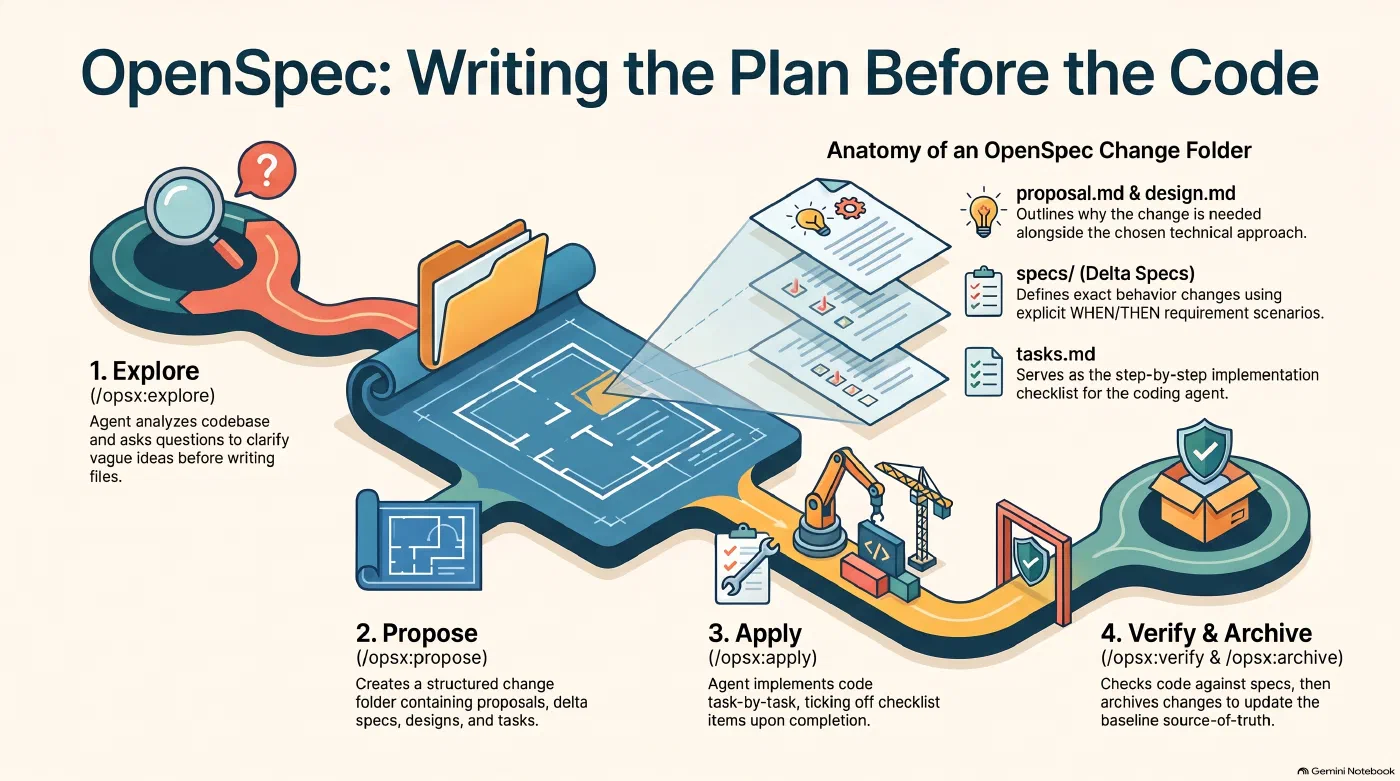
The OpenSpec workflow from explore to archive, and what goes into a change folder - AI generated
Introduction
In this short series, I want to describe how my software development workflow has changed recently. Three tools made most of the difference: OpenSpec, Beads and Worktrunk. With them, I get to working software faster, and, in my experience, with fewer tokens. For now, that is an observation, not a measurement. I have started tracking my token consumption and will share the setup in a later post. The first three posts introduce one tool each. In the fourth post, I connect the dots and explain how I use each tool on its own and how they work together.
This first post covers OpenSpec, a framework for writing down what you want to build before a coding agent starts building it.
Why Write a Spec First
A coding agent that receives a one-line request fills the gaps with its own assumptions, from the target audience down to the choice of framework. Some of those guesses are right. The wrong ones tend to show up only after the code exists, and then every correction costs another round of prompts and tokens.
OpenSpec moves those decisions to the beginning of the development process. It is an open source framework from Fission AI for what it calls spec-driven development: before the agent writes any code, you and the agent agree on a written specification of what will be built. The process starts with a broad statement and narrows it down through targeted questions. If you want to build a website, for example, the agent first asks about the target audience and the purpose of the site, and only later about the technical stack and the tasks needed to get there.
Everything OpenSpec produces is plain Markdown in an openspec/ folder inside the repository. The folder openspec/specs/ describes how the software behaves today, as requirements with concrete scenarios. Each planned change gets its own folder under openspec/changes/ with four parts:
proposal.mdexplains why the change is needed and what it covers.specs/holds delta specs, which list the requirements the change adds, modifies or removes.design.mddescribes the technical approach.tasks.mdis the implementation checklist.
The command-line tool runs on your machine and manages this structure. The planning itself happens inside the coding agent, through slash commands and skills that OpenSpec installs into the project. It supports the common coding agents, among them Claude Code, Codex and GitHub Copilot.
Installing OpenSpec
On macOS, Homebrew is the quickest route:
brew install openspec
Then initialize it in the project folder:
cd my-project
openspec init
openspec init asks which coding assistants you use and writes the matching skills and slash commands into the project. For Claude Code, they land in .claude/skills/ and .claude/commands/opsx/. To skip the interactive selection, pass the tools directly, for example openspec init --tools claude,codex.
OpenSpec collects anonymous usage data, namely the command names and the version. If you prefer not to share that, switch it off:
openspec config set telemetry.enabled false
From a Rough Idea to a Proposal
The default install comes with six commands, and four of them form the main path: explore, propose, apply and archive. The other two, update and sync, are marked experimental. Update revises the planning files of an open change, and sync merges its delta specs into openspec/specs/ without archiving it. In Claude Code, each step is a slash command such as /opsx:explore. Codex uses its skill syntax instead ($openspec-explore), and openspec init prints the right form for every tool you selected.
I start with /opsx:explore. In this step, the agent reads the existing code, if there is any, and asks me questions about the idea. Nothing gets written yet. The OpenSpec documentation calls it a “no-stakes thinking partner”, and for me it is the step where a vague idea turns into something I can describe. I do not try to settle everything here. Some questions stay open and get decided later, once there is something running to look at.
When the picture is clear enough, /opsx:propose <change-name> turns the conversation into a change folder with the four parts described above. A requirement in a delta spec is plain Markdown, with scenarios written as WHEN and THEN:
## ADDED Requirements

### Requirement: Contact form
The site SHALL offer a contact form that sends messages to the site owner.

#### Scenario: Visitor submits the form
- **WHEN** a visitor submits the form with a valid email address
- **THEN** the message is delivered and the visitor sees a confirmation
The agent writes these files, and I review them before any code exists. Correcting a sentence in a proposal is cheaper than correcting a finished implementation, so this is where most of my review time goes now.
What Happens After the Proposal
/opsx:apply hands the task list to the agent. It implements one task after the other and ticks each one off in tasks.md. On the command line, openspec list shows the progress of all open changes, and openspec view prints a one-screen summary of specs and changes.
The expanded profile adds a verify step between apply and archive. /opsx:verify compares the implementation with the change artifacts and reports what is missing or inconsistent. The report is advisory and blocks nothing. To get the step, select the expanded profile and refresh the project files:
openspec config profile
openspec update
The last step, /opsx:archive, moves the finished change to openspec/changes/archive/ and merges its delta specs into openspec/specs/. This merge keeps the specifications current. If you skip it and do not run /opsx:sync either, openspec/specs/ never learns about the completed changes, and the next proposal has no current baseline to compare against.
Conclusion
OpenSpec costs reading time before the first line of code. That time pays for itself, because the agent no longer guesses the parts I had not explained. OpenSpec is not the only framework built on this idea. GitHub Spec Kit and Kiro from AWS follow it as well.
A task list in tasks.md belongs to one change and has no priorities or dependencies. In the next post, I introduce Beads, which turns such a list into work packages that agents can pick up across sessions.
References
Author: Dr. Stephan Michard
Words: 1052